

Leave the group chat. Keep the group.
Channels instead of one endless thread, live rooms and courses inside the community, your own rules for who gets in, and membership fees if you want them.
A community: channels, live rooms and the feed on one screen.




Your best members are four hundred messages up.
The announcement, the job post and the joke all scroll past at the same speed. New members never see what came before.
Every live session means a new link, a new app and fewer people who make it.
A phone number and a first name. Members who should meet each other never do.
Community channels: one room per topic, not one thread for everything.
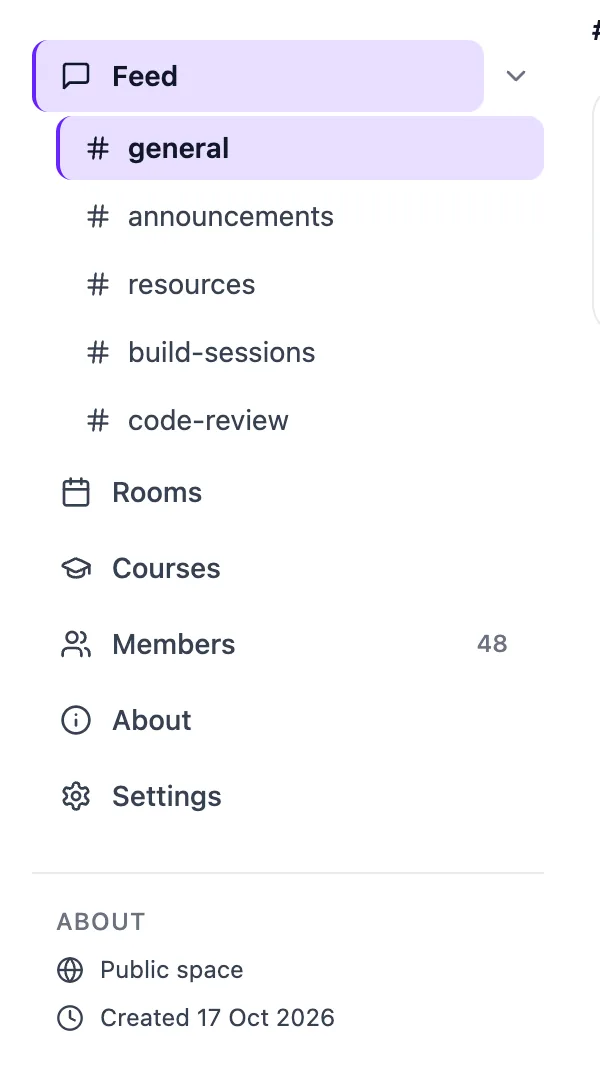
Every community starts with #general, #announcements and #resources. Add a channel per cohort, region or project, and rename or remove the defaults.
- Announcement-only channelsOnly admins post, so the news doesn't drown.
- Unread counts and pinned postsMembers see what's new and what matters first.
- Your sidebar, your orderReorder, hide or show the Feed, Rooms, Courses, Members and About tabs.
- An About pageA proper landing page for people deciding whether to join.
You decide who gets in. Then how.
Make the community discoverable or private, then pick a join mode. Add a join form to any of them, and every answer travels with the request.
Auto-approve
Anyone who finds the community can join straight away.
Open meetups, public groupsDecide by answers
Set rules on the join form. Applicants who meet them are let in, the rest are turned away automatically.
Cohorts, professional circlesRequire approval
Every request waits in a pending queue for an admin to approve or reject.
Paid, private or invite-onlyWhen you go live, they're already in the room.
Rooms, webinars and speed networking rounds open from the community's Rooms tab. Members see Live Now and press Join. No link to forward, no app to install.
- Rooms
- Upcoming and past sessions in one tab, with replays you control.
- Speed networking
- Members meet each other one to one, never the same person twice.
- Courses
- Programs and courses with certificates, inside the same community.
Membership fees, without a spreadsheet of who paid.
Tick paid membership, set a price, and the community handles billing, access and renewals. Payouts go to your own Stripe account.
How payments work- Monthly
- A recurring price in USD, with EGP as an option.
- Yearly
- Offer an annual plan and the saving is worked out and shown to members.
- Once
- A single payment to join. Good for a cohort or a closed circle.
- Grace period
- If a renewal fails, members keep access for a few days while they fix it. Three days by default.
- Coupons
- Discount codes for one community or all of them, including 100% codes for free access.
Run it with a team, not alone.
A member directory with real profiles, a pending queue, and three roles. Bring everyone from a past event into the community in one go, or invite people by email.
My members are fine on WhatsApp. Why move?
How do I bring people over?
Does it cost anything to start?
Can members meet each other, not just me?
Can it run under our association's own name?
A home they come back to.
Start a community free. Set up your channels, open your first room and invite the people you already have.